Removing redundant web content

This blog is about removing redundant web content from a large site.

Before I start, I should say that a much more sensible person would have got an agency to do this. At several points during the process (which I started in October) I’ve thought I was being far too stubbornly INTJ about the whole thing and it would be easier to hand it over to a bigger team of people who could work on it full-time. But it was interesting and technically achievable – I’ve come to realise I can’t say no to anything that can be described like that.

What were the issues?

During my first year at Time to Change I’d slowly been discovering a lot of redundant content. A lot of it was unnavigable, which I think was part of the problem – whoever created it had left, forgotten it was there or for whatever reason abandoned it to float around the website without its parents. It happens in any organisation, perhaps particularly in busy charities where everyone’s working at such breakneck speed that the phrase “just get it up there and we’ll deal with it later” can become common by necessity.

The tricky thing is that nobody does deal with it later, because we’re all straight on with the next cripplingly urgent thing. And so it continues until there are are over 5,000 out of date pages that no-one but Google has time to notice.

A crucial part of this was that we didn’t have a system for forcing parent page assignation, so bypassing this step and saving everything as a page in its own soon-to-be-forgotten-about right became inevitably common practice overtime.

A further contributor to the problem was that we had no processes in place to deal with content that had a known shelf-life, so community event listings from 2011 continued to sit there gathering dust in the absence of an agreed way of unpublishing and redirecting them.

How did we address these?

As well as dealing with the content that needed to be removed, I’ve been keen to make sure we improved our set-up to negate the need for such a time-consuming audit in the future. With a bit of development, now when people add content to the site they’re asked to assign a parent by default, and an auto-generated url now inherits that breadcrumb trail as standard.

To deal with the event listings, I’d hoped for a module that would manage these automatically based on a set expiry date, but the slightly more laborious alternative of manually setting an auto-unpublish date when approving the listing and then using Siteimprove to pick up the 404 for redirecting is a fine substitute.

Incidentally, Siteimprove has also been great for us in a number of other ways, and I found you can haggle them down fairly substantially from their opening service offer, I’d definitely recommend them.

How did we ascertain the redundant content?

Although we can export all pages on the site from our CMS, I wanted to make sure we knew which were the high performers so we were making removal decisions within an informed SEO context. With that in mind, I picked the slow route of exporting them 5,000 rows at a time, in rank order, from Google Analytics. 

Once I had a master spreadsheet of 17,000 pages, I looked through the first hundred or so to identify any top performers that might also fit the removal bill. Happily there weren’t any I could see that ticked both boxes – top performers were, as you’d hope, well used and positioned pages, or personal stories and news articles that remain indefinitely evergreen.

With that reassurance locked down, I could sort the spreadsheet alphabetically as a way of identifying groups of similar pages – e.g. blogs, news stories, user profiles and database records which we wouldn’t want to remove. It also identified duplicate urls and other standard traffic splitting mistakes. I then selected and extracted these from the spreadsheet, cutting the master down to around 10,000 pages.

Next I wanted to filter out the dead links, because we now had Siteimprove to pick these up and a weekly digital team process of redirecting highlighted 404s crawled by the software, so they didn’t need to be included in the audit.

As GA exports urls un-hyperlinked and minus the domain, I needed to add these in. I used the =concatenate formula to apply the domain and the =hyperlink formula to get them ready to be tested. I then downloaded a free PowerUps trial and ran the =pwrisbrokenurl dead link test for a couple of days over the Christmas holidays. It’s worth saying my standard 8gb laptop struggled a bit with this, so if you have something with better performance, definitely use that.

PowerUps divided my data into broken and live links so I could filter out the broken ones and be left with an updated master spreadsheet of every page that needed auditing by the team. There were just over 6,000, which we divided between us and checked on and off over several weeks, marking them as either ‘keep’ or ‘delete’ and fixing the url structures and parent assignation as we went.

That process identified 1,000 relevant and valuable pages to keep, and 5,000 redundant, out-of-date and trivial ones to remove. Past event listings make up a large proportion of these, but I’d also say you’d be surprised how many other strange things you find when you do something like this!

What’s next?

Now we know what we’re removing, I’m going to get a temp to unpublish and redirect it all, which I hope will take about a week. From there I’m going to look into how we might go about permanently deleting some of the unpublished content, as a spring gift to our long-suffering server.

Once that’s done we can move onto the content we’re keeping, so the next phase of the audit will be about ensuring everything left behind is as fit for purpose as we can make it – I expect this to go on until the end of the quarter.

That time should start to give us an indication of Google’s response to the removal of so many pages. I’m a bit nervous about this and prepared for an initial dip in traffic, but by Google’s own standards I’m hoping for a curve that looks a bit like this:

trafficgraph

I’ll keep you posted!

Initial thoughts on Facebook’s suicide prevention tool

Over a year ago now, I blogged about Samaritans Radar, a tool created by the charity that caused a lot of controversy amongst the strong mental health community on Twitter and elsewhere.

I agreed with a lot of the issues people raised, though for me privacy wasn’t top of the agenda, my worry was more around the obligation it placed on individuals to take responsibility for the safety and welfare of others – something our Government should be doing and, increasingly, isn’t.

Since then, Samaritans have been working on an alternative, something I was vaguely part of in the early stages, attending a couple of round-table feedback meetings and sharing my own experience of managing these issues on social media, in an interview format with the Samaritans digital team.

This week, Facebook have launched their suicide prevention tool in the UK, which takes elements of what the Samaritans wanted to achieve with Radar but looks, at face value, to be safer and better.

Three great things

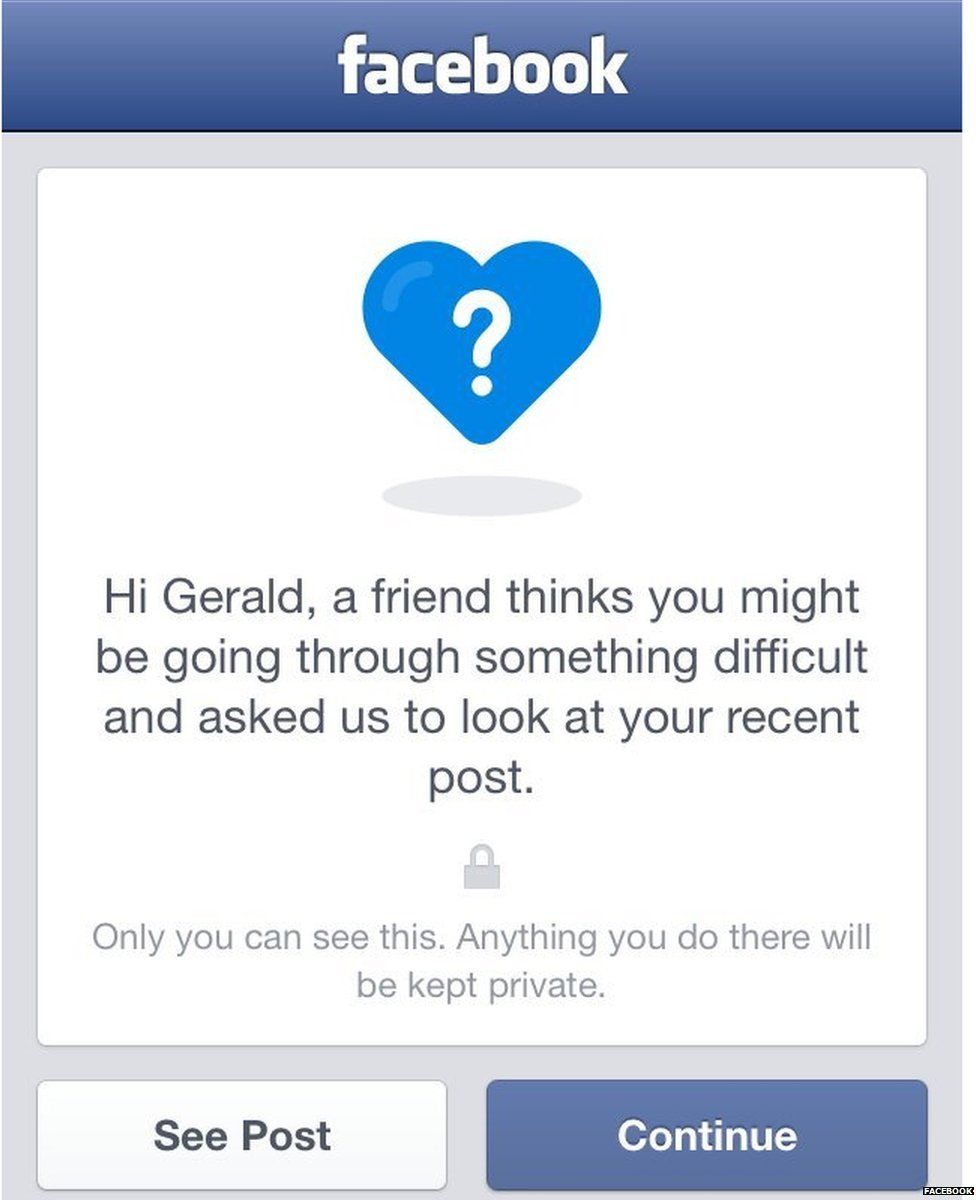
1. Anonymity for the person flagging that content to Facebook, which means they can look out for their friends without feeling alone and overwhelmed with the responsibility for keeping someone safe

facebooksuicidepreventiontool

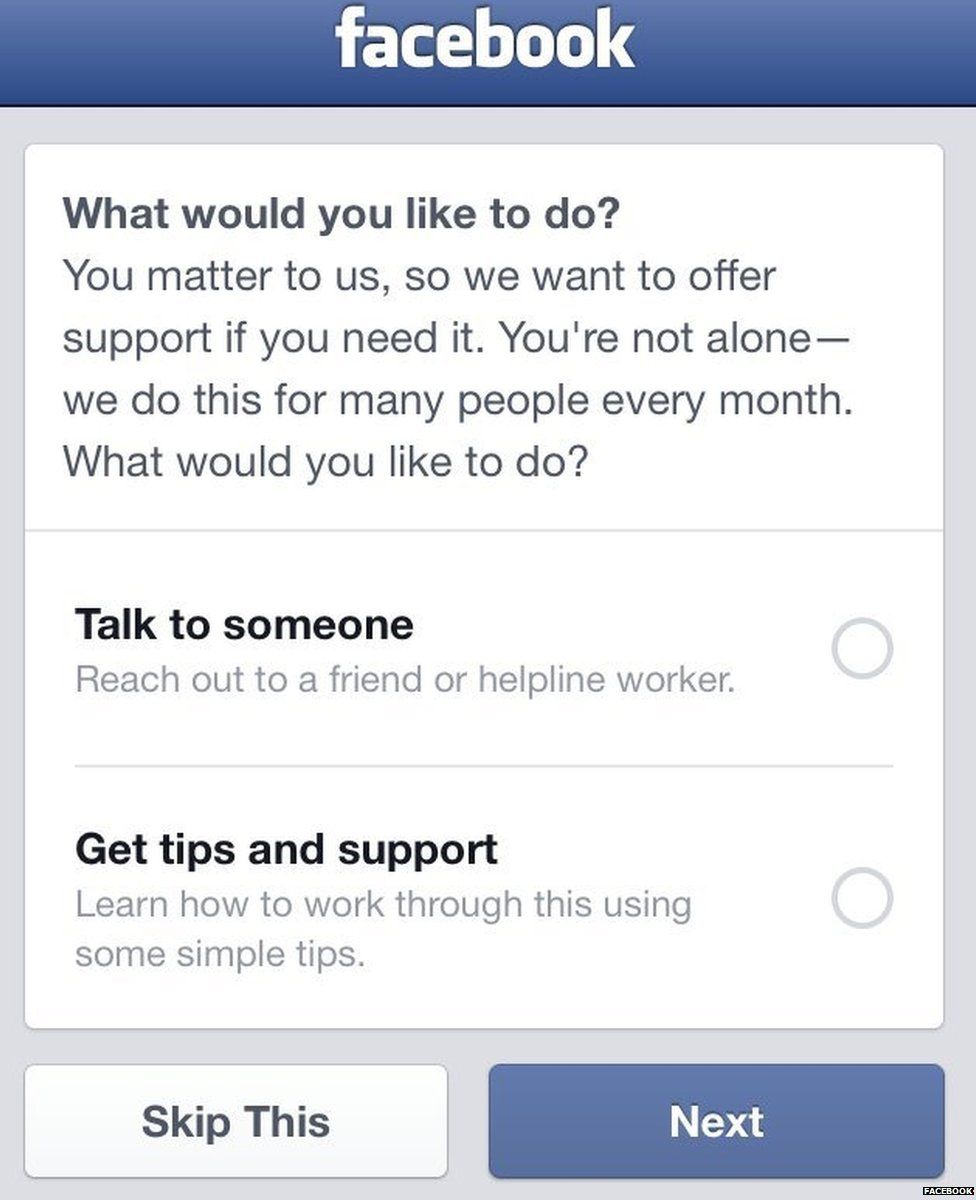
2. A practical and empathetic support journey for the person who’s feeling suicidal, including a prompt the next time they login

facebooksuicidepreventiontool2

3. Support options which connect them (anonymously and by choice) to the Samaritans, who are trained and able to provide the right help. They also get the option to connect with a friend – something that might feel more possible once you know for certain that at least one person in your network is worried about you.

In general I think there is a place for providing interventionist support within social media platforms, but I do have some reservations about the term ‘prevention’ and its potential to reduce the pressure on other agencies to create a society where 6000 people a year don’t attempt and succeed in taking their own lives.

I’m also wary of the passivity of asking for help in such a vulnerable and indirect way – if people need help they should believe in our systems enough to know they’ll get it, but since so much evidence into crisis services suggests that they won’t, people are left posting on Facebook and hoping somebody cares enough to respond.

Image credit: Felicity Morse, BBC Newsbeat.

Upscaling server capacity – part 2

Last month I blogged about how Time to Change would manage the exponential increase in server load caused by our annual marking #timetotalk day.

I talked about having six plausible options for managing the load and about the decision to choose a combination of Varnish and an additional overflow server to cope with the day’s traffic.

Setting these up was relatively painless but did involve a last minute need to migrate the whole site to a new primary server, because Varnish, for want of a better explanation, didn’t like the old one. Once that was done we were basically all set, we just had to make sure it excluded the dynamic tools we needed to run in realtime.

What was load like on the day?

Traffic levels were pretty much in line with what we expected, an increase on last year and way more than our standard infrastructure could have handled – in the end just under 50,000 sessions in 24 hours. Social media was a big driver to the site, with just under 60,000 tweets on the hashtag throughout the day – trending until about 5pm, and then again in the evening.

How did Varnish perform?

I can’t recommend Varnish enough – we set it up to manage load balancing and it handled just over two million requests through the day and barely broke a sweat, we used only 10% of our primary server’s memory, going nowhere near the overflow at all, and page load speed was a satisfying 3.2 seconds – it was perfect.

How was everything else?

Ironically after all that, our database ran into a bit of trouble around lunchtime, processing so many form requests that it crashed for around 10 minutes. But that was minor and we’ll upgrade it and increase capacity for next year – watch this space and, in the meantime, get installing Varnish!

Upscaling server capacity – part 1

At Time to Change we generally get around 1000 visitors to the site a day. On peak days, like World Mental Health Day, this might double, but there’s enough flex in our server capacity to manage that without issue. Once a year though, the first Thursday in February, we run Time to Talk Day – a massive single day campaign to get the whole country talking a mental health. We’re lucky, it’s very successful, bigger and better every year we do it – just last week I was in a meeting with someone from an agency wanting us to pay to trend that day, we were all quick to point out we organically trend all day anyway, without paying a penny. Very, very lucky.

The downside though, if we can call it that, is that we’ve now reached a point where our site’s infrastructure is not equipped to deal with the spike in traffic, which last year reached 32,000 visitors and tripled the time it took pages to load for supporters wanting to take part in the day. It never went down, which was a relief, but it was painfully slow, despite our most ambitious estimates and load tests in the preceding months.

So it’s my job this year to make sure we’re ready, not ready for a sensible growth on last year, but really ready for the kind of numbers we feel arrogant even talking about – just in case. In previous jobs I’ve just called the hosting company to increase the server capacity, maybe even kick a few smaller charities off to give us maximum breathing room. But the issue at Time to Change is we’re already on the biggest physical server, at its highest capacity, so the standard option isn’t an option for us. Ruling in and out the various alternatives has been pretty stressful as they all carry risks and, as ever, it’s a ridiculous time of year with millions of other urgent things happening at the same time.

So what are the options?

  1. Caching – improving this made a great dent in our performance by increasing our capacity by 20%, but we need more than that to get through Time to Talk Day
  2. Move to a virtual server – this does solve the immediate issue as the capacity is exponentially better, but then we’re left with a problem of poor performance due to underload the rest of the year, so it’s not a good long-term solution
  3. Temporary, reversible migration to a virtual server – this is a possibility but a very risky one as you never really know how your site’s going to perform in a new environment until it’s had some time to bed in and be tested to its limits in a live setting – none of these we really have time for
  4. A microsite – if I was a web developer I’d probably go for this, move the entire problem into an isolated container that guarantees the stability of the main site? Sounds perfect. Unfortunately I work in comms and microsites are a brand and UX sacrifice I can’t live with, so we’re not doing that
  5. Varnish – the Iron Man of caching systems it turns all your dynamic content static (except the bits we need on the day) and improves performance by about 50%
  6. Match our current server with another and load balance on the day – like an overflow unit for when the traffic hits its peak

I’m going for 5 and 6, we’ve got just over a month to get it right and in the meantime I’m site auditing our 10,000 pages to make sure we’re only working as hard as we need to. In part 2 I’ll let you know how it went!

PS – another way to find out is to take part in the day, 4 Feb 2016, let’s get the nation talking about mental health.

Why sprint cycles work for me

I’ve been lucky enough to inherit my job at a time when digital was expanding for Time to Change.

Previously development work could be easily contained on an ad hoc basis, with emails back and forth to manage each project and few enough demands on a small team to make this possible.

Since joining, that’s changed and I needed a system to ensure workload and delivery schedules could be predictable, to satisfy the demands of internal teams as well as ensuring we could confidently meet our own commitments for development and growth.

To achieve this I set up a sprint cycle system, managed through Podio, the online project management tool. 

How our sprint cycles work

During each month I plan for the following sprint, working out priorities for development within our team as well as communicating more widely with the rest of the programme about ideas they might have to make their jobs easier or better respond to user experience issues they’ve identified.

I then wireframe all the ideas to check everyone’s on the same page and collate all this into an amount I think can reasonably and logically be achieved in a given month, then email the developer with a headline description of the forthcoming work. This is an important step because it gives him the chance to identify any areas that might be more difficult to achieve or require greater resources that we have available.

Once I have the go-ahead, I begin writing a detailed brief, dividing the work into sections (usually by team or area of the site) and within that splitting each component into individual tasks. I then email for a formal quote.

Once the quote’s received and approved, it’s usually now the end of the month, I set up an e.g. “October sprint cycle” project on Podio for the upcoming month and upload the brief.

Once the first of the month ticks round, the developer starts work and usually completes the first daft on staging within a couple of weeks, having checked any small details with me via the project comment stream. Then I’m ready to begin first round user acceptance testing.

Testing involves gathering all internal stakeholders and/or recruiting external user testers for bigger projects. It follows a similar process to briefing, I take the original brief and allocate each task a place in a UAT table in Word. Table headings are usually Job (component of work) Status (further work / ready to deploy)  and Notes (explanation of edits, etc) As I check each component and run through it with the team of testers, feedback and status confirmation is entered into the table and presented back to the developer.

Edits are then made and the same process repeated until the status of every job is “ready to deploy.” At this point it’s a couple of days from the end of the month. The developer deploys to live, giving us enough  time to work out any live environment bugs. Internal stakeholders are gathered again for signoff, they can make minor tweaks or alert me to any strange browser or mobile behaviour I can’t replicate, but all “actually can we also have this” requests are labeled as new requirements and will go into the next month’s sprint.

Final tweaks are made then that’s it, sprint delivered, everyone’s happy and the whole thing begins again  the following month.

I find this by far the easiest and most efficient way to manage development. It does lead to stressful spikes in workload, but as long as you’ve planned for those, built in the time and prepped everyone in advance, you’ll be fine.

I hope this is useful if you’re thinking about moving to the sprint model!

A record breaking post

A couple of months ago I had a record breaking Facebook post. It was ridiculously successful, certainly the biggest post for Time to Change, but I was at a conference a little while ago and Oxfam were talking about their biggest ever post reaching 5 million people. Ours was 8.2 million, suggesting we might have beaten them too…

I’m generally alright at predicting how well posts will do and I was pretty sure this one would be post of the month, but post of the whole seven year programme was definitely unexpected!

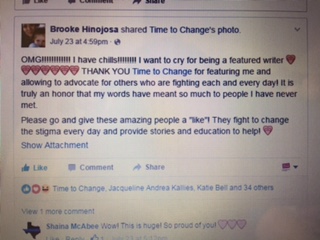
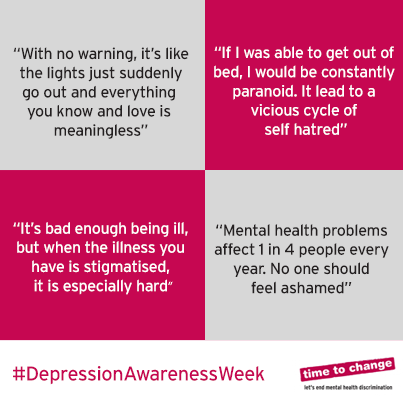
This was it, for Depression Awareness Week 2015. It got 19,505 likes, 100,976 shares, 550 comments and a reach of 8.2 million.

Copy

“Today is the start of Depression Awareness Week 2015.

Whatever depression feels like for each of us who experience it, no one should feel ashamed of what they’re going through.

Our latest personal stories on living with depression and challenging stigma: http://bit.ly/1Dh9dWq

Image

depression awareness week

Because it was so unusually successful, a few people asked why I thought it did so well.

Here are 10 things I came up with

  1. Luck – sometimes there’s no competition, you just get lucky and your content breaks through the noise of the day
  2. Awareness days are always big – it’s pure social capital, everyone wants to be part of the action
  3. It’s depression – the most common of all mental health problems, often traversing the field of mental health
  4. Timing – I was a little bit cheeky here as it was Depression Alliance‘s day, I kept an eye on their page on my commute thinking if they post before 9am then the rest of the day is fair game. As it was they still hadn’t posted by 9.50, so I decided to go for it. Being the bandwagon people are jumping onto is a huge advantage, it would have been totally fair if that was Depression Alliance’s bandwagon, but I wasn’t going to wait all day for them to get there.
  5. Layout – a couple of years ago I downloaded this app called Diptic and, when I was working at Mind, tried out a post in one of their 4 square formats. It  turned out to be really popular, so I’ve been using that format quite regularly since
  6. Personal stories – I tried to make the copy on this as relatable as possible, using some of my own experience but written in a way I knew would ‘work’ as well as experiences from people who had written blogs for us in the past. This makes the most of social capital, people share it because it’s how they feel too.
  7. In the final box I used some really campaigny language, which I knew had the potential to energise every single person who likes our page, because it’s the best of what we do in one inspiring summary
  8. Headlines – in my experience, posts with headlines do better than posts without
  9. Inclusivity – I never want to be top down when I post, never giving a piece of content to our audience, but sharing it with them as equals
  10. Copy format – I think this is the ideal layout for a post, I wrote it a few times, testing different word and character configurations on mobile and desktop until I was sure it would perform well

They’re my 10, you might have others, or have had similar success yourself, I’d be interested to hear!

Charity spending is right and necessary

Every now and then, wherever I work, I have to brace myself for “could you advertise these jobs?” or “could you share this blog from the CEO?” These are both pretty routine things and shouldn’t involve setting aside half a day to argue with people on social media, but invariably they do.

Charity spending, lobbying, expanding, any action that implies progression in a cause which I hope we all believe is right and necessary consistently provokes a dispiritingly naive backlash from a vocal few.

This issue angers me not because I resent the irony of spending valuable charity time engaging in futile conversation, but because I believe in the bigger picture – I want us to beat cancer, to end mental health discrimination, cruelty to children and people drinking unsafe water. I don’t believe money spent or high level conversations had in order to achieve these goals are unnecessary or wasted, I believe they are in fact the only way we’ll get to where we need to be within our western capitalist structure.

This framework is something we cannot change and I find it unbearably frustrating when successful charities are damningly compared to a group of five people working for free in a tiny room above a shop, they are not more worthy of your time or more committed to an issue you care about because they don’t spend money on achieving it. Instead, they are unknown, they can’t make any difference in the ways that count because nobody knows they’re there, they don’t have any political pull, they can’t afford to hire the best people for the job, they can’t get anybody to donate to them, fundraise for them, strategise for them or spread their message of change.

If we need any more convincing on the roadmap to making a difference, we need only to turn to the person next to us and ask them to name a charity. Did the person next to you say Macmillan, Cancer Research UK, Greenpeace, Oxfam, UNICEF or Amnesty International? How many named Green Light, a tiny Cornish charity working with autistic children whose website is impossible to find because they’ve decided not to invest in a good enough web manger who knows how to address that?

Success costs money and it’s not money that’s wasted, the successful charities are the only ones who are changing the world. Everybody who works in the sector could earn more outside of it, but we’re here because we want the world to be a better place. I don’t feel my salary is profligate, I’m a manager at a big UK charity and I share a one bedroom flat with my partner and my cat. We’d like to own a house one day and maybe upgrade the cat to a baby, these are ordinary things but they feel very out of reach for us. And yet I have no interest in offering my skills to the private sector because I believe that what I’m doing and what I’m part of is making a difference to people’s lives. As long as that remains our motivation to keep growing and reaching then that’s exactly what we should do.

Samaritans Radar is about more than privacy

Today the Samaritans launched a Twitter app designed, essentially, to help stop people in mental health crisis from slipping through the digital net.

As the charity relies almost entirely on volunteers, and as suicide remains one of the UK’s biggest killers, I can certainly see why they might commission a project which monitors people’s tweets and gives them thousands of extra eyes and ears across the platform.

How does it work?

Samaritans Radar isn’t a sentiment analysis app, it uses keywords to detect when someone is really struggling and might be at risk of taking their own life. Tweets containing those keywords are then sent as an alert to another user who has requested to ‘monitor’ that person’s account.

So why are people upset?

Building an app which allows users to set up alerts on each other’s profiles is all a bit Orwellian and the majority of concerns raised have centred around privacy. The mental health community on Twitter is a strong one and many use it as a way of communicating and supporting each other almost privately using the @mentions feature. The idea that their tweets might be curated and reported on by a third party has caused a huge amount of anxiety in the few hours since its launch.

An added and important concern is that it’s the Samaritans causing this anxiety, they are such a trusted player in the mental health world and for many they’re a lifeline in a crisis, people feel badly let down, perhaps more so than if an anonymous agency had developed the idea.

Is there more to be worried about?

Yes. Although privacy has emerged as the leading cause for concern today, I don’t think it’s the most important one. Currently, many of the people who are so worried about the app are using Twitter in a way that isn’t compatible with the how the platform is designed. Feeling like you’re having a private conversation is not the same as having one, Twitter is the very antithesis of private and everything outside of the DM feature is publicly accessible. Samaritans Radar does not change that.

Three things we should also consider

1. People shouldn’t feel it’s their responsibility to save anyone. Working in mental health for four years, one of the most surprising things I’ve learned is that often people don’t feel they deserve support. This means that many who have struggled themselves want to give back as much as they feel they have taken and will sign up to the app to help anyone they can. When someone isn’t well themselves this isn’t helpful or healthy and makes people vulnerable to a decline in their own mental health. As a result, I think Samaritans Radar risks hurting as many people as it helps.

2. Users aren’t trained to support people in crisis. Although, broadly speaking, people within Twitter’s mental health community have personal experience and may well have a good idea what first response support might look like, it shouldn’t be their responsibility to be that person when someone’s in crisis. It puts an enormous onus on those people to know exactly how to respond, placing them in the vulnerable position of feeling responsible for saving someone’s life. Imagine if you were someone receiving alerts and you missed one because you were out to dinner with a friend or because you were in hospital receiving support for a decline in your own mental health. If you later logged onto Twitter to find that someone had taken their own life after sending a tweet that you’d been alerted to but hadn’t seen, you wouldn’t be responsible for their death but it’s not a huge stretch to imagine you might feel that way.

3. It matters whether someone makes the choice to tell the right people how they feel. This is perhaps the most important one for me because it gives power to the person in crisis. Our systems are crap, people wait forever for help, they’re not listened to, they’re not treated with dignity and respect, they’re turned away from A&E and they’re often not even counted as ill because what they live with is a mental rather than physical condition. The most important power that people have to change services and attitudes in mental health is their voice. I firmly believe that people shouldn’t be passive recipients of support, they should ask for it and be given it as a result, just like anybody with cancer or a heart defect. Samaritans Radar allows people to send a tweet into an anonymous void for technology to then pick up and make another user’s concern. Support shouldn’t be this way, people should know where to go to get it and have faith in a system they pay for that what they need is available, accessible and life changing.

That’s what will save people, it’s not down to the merits of any app, it’s down to all of us to demand that the gap in the market that led to Samaritans Radar should not exist in the first place.

How Mind managed to publish breaking news, from 2011

Today a totally ridiculous coincidence happened, which I want to document somehow since it was fun to fix and will probably never happen again.

What happened

When Mind launched their new website back in November 2012, we hired a keen team of digital volunteers to set about the tedious task of migrating content from one site to the other. Mind has a huge site, it was an endless and dispiriting task which we eventually decided to shelve, once the main content was over.

What we left behind were several hundred old news stories and blogs, back as far as 2010. Since then we’ve had a fair amount of internal and external pressure to bring the rest across, none more demanding than Moz.com and its hard to ignore report of 404 errors resulting from dead inbound links. Google is our master and we’ve been willing anarchists causing SEO chaos all over the internet, it was time for action.

A few weeks ago we decided to revisit the monster; exported the dead links in priority order and hired someone to migrate them. He’s been doing his job excellently for most of every day since he started, all’s been fine.

Today, we had an announcement to make, a lot of work went into getting as far as launching the story and the last bit was the news article – no big deal. The media team added the news story, naming it “Mind Media Awards: shortlist announced”, which naturally inherited the standard url format taking into account its structural position and title. All fine.

Elsewhere in the office, not 20 seconds before this happened, our patient content migrator had published a story, from the hundreds he was working through, called “Mind Media Awards shortlist announced”, a defunct page from back in 2011. Not a risk, right? Our CMS is smart enough not to let us name two pages the same thing, that would be silly. Except that he didn’t, there was no colon in his news story, so the website says “fine, these are different things, you can have both.”

But back in the 1970s, a group of nerds at Ascii decided characters like colons in a url pathway would probably confuse or break things, so decided to omit them, which means servers don’t read that they were ever there, even if good CMSs like Umbraco are fine with the whole thing.

At 4pm we tweet our release and point to the news story – right before some sharp-eyed tweeters alert us to the fact we’ve sent out a story from 2011. I’ve been managing the migration guy while my boss is away so know straight away what must have happened (and what a ridiculous coincidence! Of all the hundreds of urls on that list!)

To solve it, I set up a 301 from his content node to ours. Only of course it doesn’t work, because Umbraco knows they’re different, but the server’s thinking “why are you making me serve this page in circles you strange person, what kind of digital officer are you?” And I’m thinking “how on earth did this all happen at the same time?!”

The resolution

We delete the migrated page, change the url of the news story and set up a 301 from the old to the new. Sorted. 15 minutes of team-awe ensue, while the rest of social media is none the wiser.

Ace.

What’s wrong with irresponsible reporting around suicide

Yesterday the world received the sad news that Robin Williams had taken his own life after struggling with addiction and depression for many years.

Despite its prevalence, depression is still a much misunderstood illness and mental health organisations, along with their supporters, fight hard to ensure it has parity of esteem with physical health conditions.

A lot has been achieved in recent years, through huge national campaigns such as Time to Change, as well as the work of leading mental health charities like Mind and Rethink Mental Illness.

As ever, the media have a huge role to play in shaping public attitudes towards mental health, as well as a responsibility to report on suicide in a way that is neither glorifying nor triggering for the millions of people around the world who are struggling.

The first tweet I saw about Robin’s death was the beginning of what I knew would be a shameful few days of irresponsible messaging which can, ultimately, claim further lives.

This post by The Academy is intended to be a well meaning tribute to the star’s work as the Genie from Aladdin. It has been retweeted over 3000,000 times so far, as undoubtedly kind hearted people from all over social media continue to share it in Robin’s memory.

They shouldn’t.

Despite its good intentions, what this post says is ‘when the pain gets too much, there is a way out.’ Wanting it all to stop is such a common feeling for people who are struggling with suicidal feelings and the media cannot continue to portray taking one’s own life as a peaceful solution to all-consuming depression. It isn’t peace, freedom or tranquility, it’s death – a permanent end to everything you are.

It’s dispiriting to have to talk about them but, as ever, the tabloids deliberately abused well established media guidelines on responsible reporting about suicide. If there’s one rule which everybody in the industry can’t help but know, it’s that you never ever mention methods. Doing so is akin to publishing an instruction manual to vulnerable people on the most effective way to end your life and leads to what researchers call ‘contagion’ or copycat deaths.

Particularly horrific examples include:

This is not ok and the Samaritans guidelines on responsible reporting are freely available for anybody who’s unsure, please do read and share them when you can.

Now that they’re out there, it’s not too late to make a complaint and help make sure these guidelines are followed. You might just save a life.